How to Give Guests Their Key Info Even Without Internet (WiFi, Check-in & More)
By StayScan Editorial Team · Published · Last updated
Give guests everything they need offline at arrival, a printable or downloadable card with WiFi, door codes, checkout instructions, and emergency contacts for when they have no signal or mobile data.
It happens more often than most hosts realise. A guest lands at the airport after a long flight, their roaming data is off, the local SIM hasn''t arrived yet, and they''re standing outside your property with no idea what the door code is. Or they have the code, somewhere in an email thread, but no signal to open it.
This scenario isn''t a guest failure. It''s a host communication gap. And it''s completely solvable.
The "No Internet on Arrival" Problem Is More Common Than You Think
International travellers are the most obvious case, but it''s not just them. Guests who travel between mobile networks, stay in rural areas with poor coverage, or simply have data-saving mode turned on all face the same friction: they need your property''s essential information at the exact moment they can''t reliably access the internet.
The information they need is almost always the same:
- WiFi network name and password
- Check-in time and step-by-step entry instructions
- Check-out time and any checkout requirements
- Property address and how to find it
- Host phone number and email in case something goes wrong
If any of these live only in your Airbnb message thread or a link they haven''t opened, a guest with no signal is stuck. And a stuck guest is a guest who calls you in a panic, if they can even do that.
What Hosts Usually Try (and Why It Falls Short)
Sending a Pre-Arrival Message
The most common approach: send all the details in a pre-arrival message on Airbnb or via email. The problem is that messages live in inboxes, which require internet to open. If a guest didn''t read it before losing connectivity, the information might as well not exist.
A Printed Welcome Card
Some hosts leave a card inside the property. Better than nothing, but it requires the guest to actually get inside first, which is exactly what''s in doubt when they''re standing at the door without the entry code.
A Laminated Sheet or Welcome Book
Popular with experienced hosts. Effective once the guest is in. But if the check-in instructions are the thing they need before they get in, and those instructions are inside the property, the guest still has a problem.
None of these solutions address the core issue: guests need the essential information before they arrive, in a format that works without internet.
The Right Solution: A Downloadable Offline Info Card
The cleanest fix is to give guests a single document, a compact, readable card, that they can save to their phone or download as a PDF before their trip. It doesn''t need to be elaborate. It needs to contain the five things listed above, presented clearly, with a way to reopen the full digital guidebook when they''re back online.
This is exactly what StayScan has built into every guest guidebook.
How StayScan''s Offline Card Feature Works
Every StayScan guest guidebook includes a download button in the top navigation bar. Guests see it the moment they open the guide on their phone, no hunting, no instructions needed.
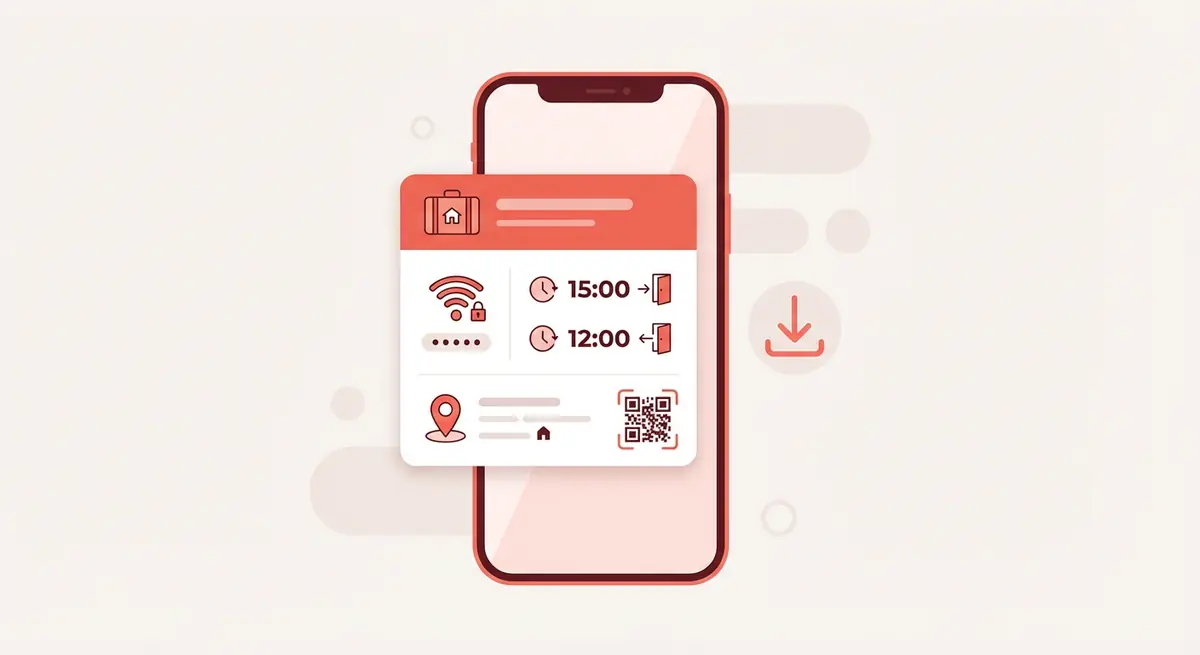
Tapping it opens a "Save for Offline" dialog that explains clearly what''s included. The card contains:
- WiFi network name and password, displayed in a clear, readable panel
- Check-in and check-out times, shown prominently with large text
- Property address, with a direct Google Maps link for when they do have signal
- Host contact details, phone and email, tappable directly from the card
- QR code, to reopen the full digital guidebook the moment they''re connected again
Tapping "Download Card" opens a print preview. The guest taps "Save as PDF" and the card is saved to their device. From that point, it works completely offline, no app, no account, no signal needed.
What It Looks Like From the Guest''s Perspective
Here''s the sequence from the guest''s side:
- They receive the guidebook link in your pre-arrival message (or scan the QR code at your property)
- They open the guide, see the download icon in the top bar
- They tap it, review what''s included, and tap "Download Card"
- The card opens as a print-ready page in their browser
- They save it as a PDF to their phone
- On arrival, even with no signal, they open the saved PDF and have everything they need
The whole process takes about 20 seconds. Most guests do it automatically once they see the option is there, especially international travellers who know connectivity can be uncertain.
What It Looks Like in the StayScan Interface
Below is the actual download button and dialog from a live StayScan guidebook, in this case, the JB City Suite demo property. The download icon sits alongside the language selector in the top navigation bar, always accessible regardless of which tab the guest is on.
You can see it live yourself, the StayScan demo guidebook has the feature enabled. Tap the download icon in the top right of the header to see exactly what your guests will experience.
Why This Matters for Reviews
Guest reviews frequently mention the arrival experience. "Easy check-in", "everything was exactly as described", "great communication from the host", these are the phrases that drive five-star ratings. The offline card directly supports all three.
Conversely, a bumpy arrival, standing outside, unable to access entry instructions, calling the host in a panic, almost always shows up in the review tone, even when the host resolves it quickly. A guest who arrived stressed rarely leaves a review as warm as one who arrived confident and informed.
The offline card eliminates the most common cause of arrival stress. That alone makes it worth setting up.
Setting Up the Feature in StayScan
No separate setup is required. The offline download card is included in every StayScan guidebook automatically. It pulls information from the sections you''ve already filled in:
- WiFi details come from your property settings (WiFi SSID and password)
- Check-in and check-out times come from your Check-in / Check-out section
- Address comes from your property address field (with automatic Google Maps deep link)
- Host contact comes from your phone and email fields in property settings
- QR code is generated automatically from your guidebook URL
If you''ve already set up your StayScan guide, the offline card works immediately, your guests already have access to it. If you haven''t, getting started takes about 15 minutes and the offline card is available from the moment you share your first link.
For Hosts in High-Tourism Areas
If your property attracts international visitors, whether in India, London, Dubai, or anywhere with significant overseas tourism, the offline card is particularly valuable. International guests are the most likely to arrive without local data, and they''re often the least familiar with the area, making arrival confidence even more important.
Hosts in these markets who mention the offline card in their pre-arrival message ("I''ve included a downloadable offline card in the guide, handy if your data isn''t set up yet") consistently report that guests mention it positively, both directly and in reviews.
Combining Offline and Online: The Full Picture
The offline card isn''t a replacement for a well-built digital guidebook, it''s a complement to it. The full StayScan guidebook contains everything guests need throughout their stay: local restaurant recommendations, transport guides, house rules, FAQ sections, and more. The offline card is just the emergency kit, the five things that matter most when connectivity fails.
Together, they cover every scenario:
- Before arrival, with internet: guest opens the full guidebook, reads recommendations, plans their trip
- Before arrival, offline: guest uses the saved card to get in, connect to WiFi, and contact the host if needed
- During the stay: full guidebook is accessible via WiFi for local tips, house info, and FAQs
- After the stay: the QR code on the card reopens the guidebook for any follow-up needs
This approach, digital guide backed by an offline card, is the most complete guest communication setup available to short-term rental hosts today.
Frequently Asked Questions
How do guests access the offline card?
The download button appears in the top navigation bar of every StayScan guidebook, next to the language selector. Guests tap it, review what''s included, and tap "Download Card." This opens a print-ready page in their browser, which they save as a PDF. The saved PDF works completely offline, no app or account needed.
What information is included in the offline card?
The card includes: WiFi network name and password, check-in and check-out times, step-by-step check-in instructions (if configured), property address with a Google Maps link, host phone number and email, and a QR code to reopen the full digital guidebook when the guest has signal again.
Does the offline card update automatically if I change my WiFi password?
The offline card is generated fresh each time a guest downloads it, pulling the current values from your StayScan guide at that moment. If you update your WiFi password or check-in instructions in StayScan, any guest who downloads the card after that update will get the new information. Cards that were already saved will still show the old details, which is why it''s good practice to ask returning guests to re-download if anything has changed.
Do I need to do anything to set up the offline card feature?
No setup is required. The offline card is built into every StayScan guidebook automatically. It pulls from the information you''ve already entered: WiFi details, check-in/out times, address, and host contact. As long as those fields are filled in, the card is ready for your guests to download.
What if a guest doesn''t download the card before they lose internet?
The card needs to be downloaded while the guest has connectivity, ideally at home or at the airport before they travel. This is why it helps to mention it explicitly in your pre-arrival message. Something like: "The guidebook link includes a downloadable offline card, worth saving before you travel, especially if you''re coming from abroad." Most guests who see the option will use it.
Can guests save the card on iOS (iPhone) and Android?
Yes. On iOS, tapping "Save as PDF" from the print dialog saves the card to the Files app or Photos. On Android, the PDF is saved to the device''s Downloads folder. Both work entirely offline once saved. The card is also printable for guests who prefer a physical copy.
Is this feature available during the StayScan free trial?
Yes, the offline download card is included in all StayScan plans, including during the free trial. It''s part of the core guest experience, not a premium add-on. Start your free 30-day trial at stayscan.app, no credit card required.
Can I send the offline card directly to guests instead of making them download it?
The offline card is designed to be downloaded by the guest directly from your guidebook, which ensures they always get the most up-to-date version of your property information. If you''d like to send something proactively, sharing the guidebook link and mentioning the download button is the recommended approach, it also gives guests access to the full guide at the same time.
The Bottom Line
Guests who arrive confidently leave better reviews, ask fewer questions, and are more likely to return. The offline info card is one of the simplest ways to ensure that confidence, it takes no ongoing effort from the host and solves a real, recurring problem that most hosts have experienced firsthand.
If you''re already using StayScan, your guests have access to this feature right now. If you''re not, getting started takes about 15 minutes (30-day free trial, no credit card) and includes everything covered in this post.
For more on building a guest experience that drives five-star reviews, see our guides on getting 5-star reviews consistently, sharing WiFi details with guests, and creating a digital guidebook for your property.
Start your free 30-day trial at stayscan.app →
StayScan is a digital guidebook for Airbnb, VRBO, Booking.com and Agoda hosts: one QR code gives guests Wi-Fi, check-in steps, house rules and local tips in 30+ languages. Create your guidebook with a 30-day free trial, no credit card required.